
Free printable debt snowball tracker
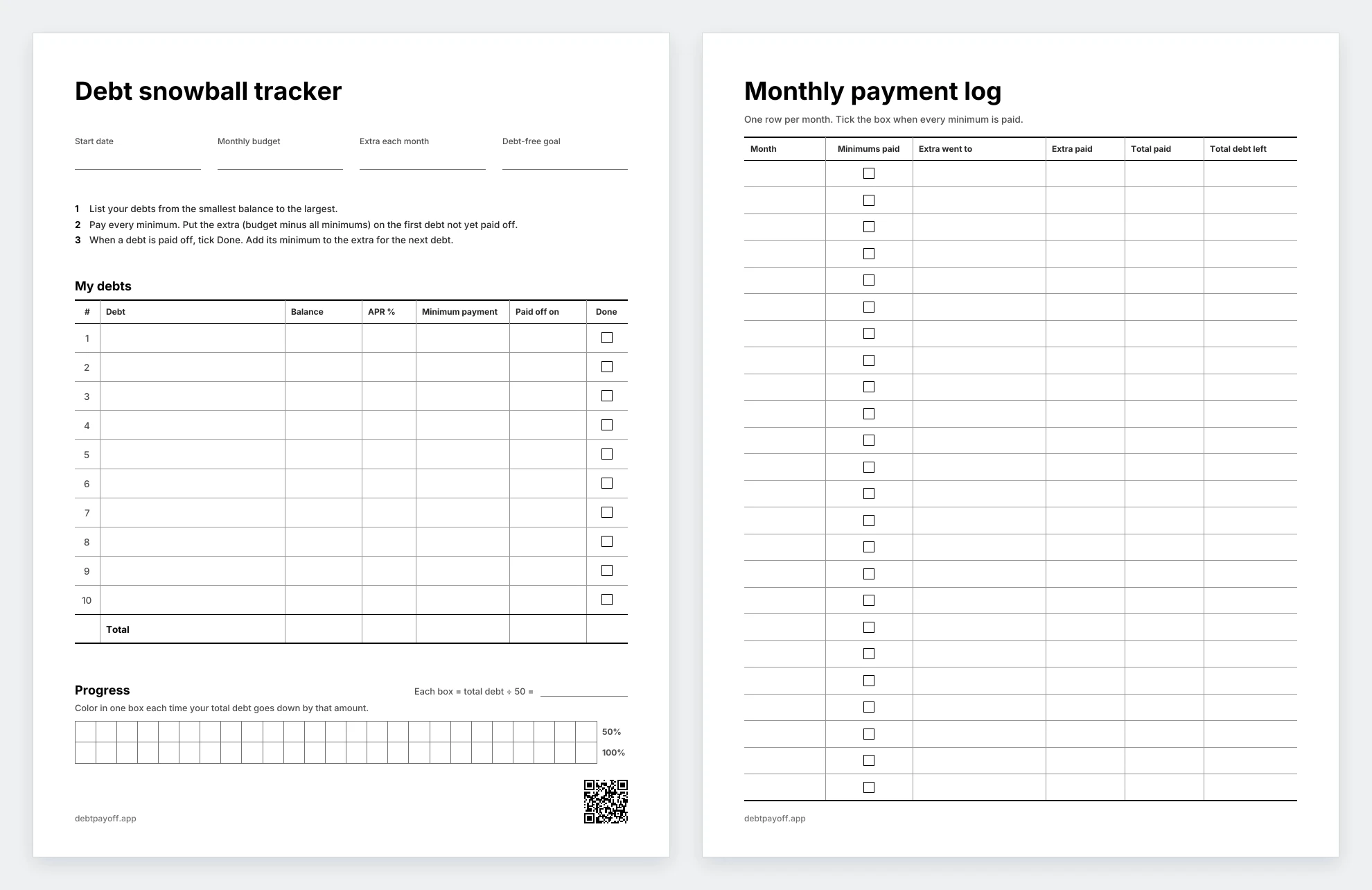
This debt snowball printable is a free two-page PDF for paying off debt on paper, with a list for up to 10 debts, a log for 24 months of payments and 50 boxes to color in as your total goes down.
- Free, no sign-up
- US Letter and A4
- Prints in black and white
 Free, no sign-up
Download the printable
 US Letter PDF (59 KB)
US Letter is the usual paper size in the US and Canada. A4 is the usual size in most other countries. Both files have the same two pages.
- Page 1
- A table for up to 10 debts, the three snowball steps and 50 progress boxes
- Page 2
- A payment log with one row per month for 24 months
- Paper
- US Letter (8.5 × 11 in) and A4 (210 × 297 mm)
- Ink
- Black and gray lines on white, with no color fills
- Currency
- Any. The sheet has no currency signs.
The two pages
How to fill it in
Use page 1 as a debt payoff worksheet when you start. Then use both pages as a tracker every month.
- List your debtsWrite each debt with its balance, APR and minimum payment. Start with the smallest balance and end with the largest. Add up the balances and the minimums in the Total row.
- Find your extraWrite your monthly budget for debt. Take away the total of the minimums. What is left is your extra each month.
- Pay the minimums and the extraPay the minimum on every debt. Put the extra on the first debt in your list that is not paid off yet.
- Roll the payment overWhen a debt is paid off, write the date and tick Done. Its minimum joins your extra for the next debt.
- Log each monthOn page 2, write what you paid and the total you still owe. Divide your starting total by 50. Each time your debt goes down by that amount, color one box on page 1.
Get your payoff dates from the calculator
The printable does not calculate anything. To see when each debt will be paid off, enter your debts in the free debt payoff calculator. Under the results, choose Print my plan. The printout shows your debt-free date, your debts in payoff order with the month each one is paid off, and the payment for every month. Its QR code opens the same plan again. Write the debt-free month in the Debt-free goal field.
Track the plan on iPhone instead
Debt Payoff Planner: Tracker is an iPhone app for the debt snowball and avalanche. You type in your debts, and it plans the payoff and records each payment. It is free for up to 3 debts, with no account and no bank link. Premium costs $4.99 a month or $29.99 a year. See it on the App Store.
Questions
All questions
Is the debt snowball printable free?
Yes. Both PDFs download from this page. There is no sign-up, no email and no account.
Should I print US Letter or A4?
Pick the paper in your printer. US Letter is the usual size in the US and Canada. A4 is the usual size in most other countries. Both files have the same two pages.
Does it print in black and white?
Yes. The pages use only black and gray lines and text on white paper, with no color fills.
What if I have more than 10 debts or need more than 24 months?
Print page 1 again for the next 10 debts. Each new copy of page 2 holds 24 more months.
Can I use it for the debt avalanche?
Yes. List your debts from the highest APR to the lowest instead of by balance. Everything else works the same. The avalanche usually costs less interest, and the snowball usually pays off your first debt sooner.
Which currency does it use?
Any. The sheet has no currency signs, so it works in dollars, euros, pounds or any other currency.
Read next
All guides- Debt payoff calculatorCompare the snowball and avalanche methods with your balances, interest rates and monthly payments.
- Debt snowball spreadsheet (free .xlsx)A free template for Numbers, Google Sheets and Excel. Snowball or avalanche, up to 10 debts.
- Debt snowball vs. debt avalancheTwo ways to choose where your extra payment goes. Compare the order, time and estimated interest.


