
Free debt snowball spreadsheet for Numbers, Google Sheets and Excel
This debt snowball spreadsheet is a free .xlsx template that turns up to 10 debts and one monthly budget into a month-by-month payoff plan, with the snowball or avalanche method.
- Free, no sign-up
- Opens in Numbers, Google Sheets and Excel
- Matches our calculator to the cent
 Free, no sign-up
Download the spreadsheet
 Download .xlsx (202 KB)
Or build your plan in the free debt payoff calculator and download it. Under your results, choose Download spreadsheet to save the plan as a CSV file.
- Debts
- Up to 10
- Methods
- Snowball or avalanche, picked in one cell
- Results
- Debt-free month, total interest, and each debt’s payoff month and interest
- Schedule
- Payment, interest and balance for every debt, up to 360 months
- Currency
- Any. The cells hold plain numbers.
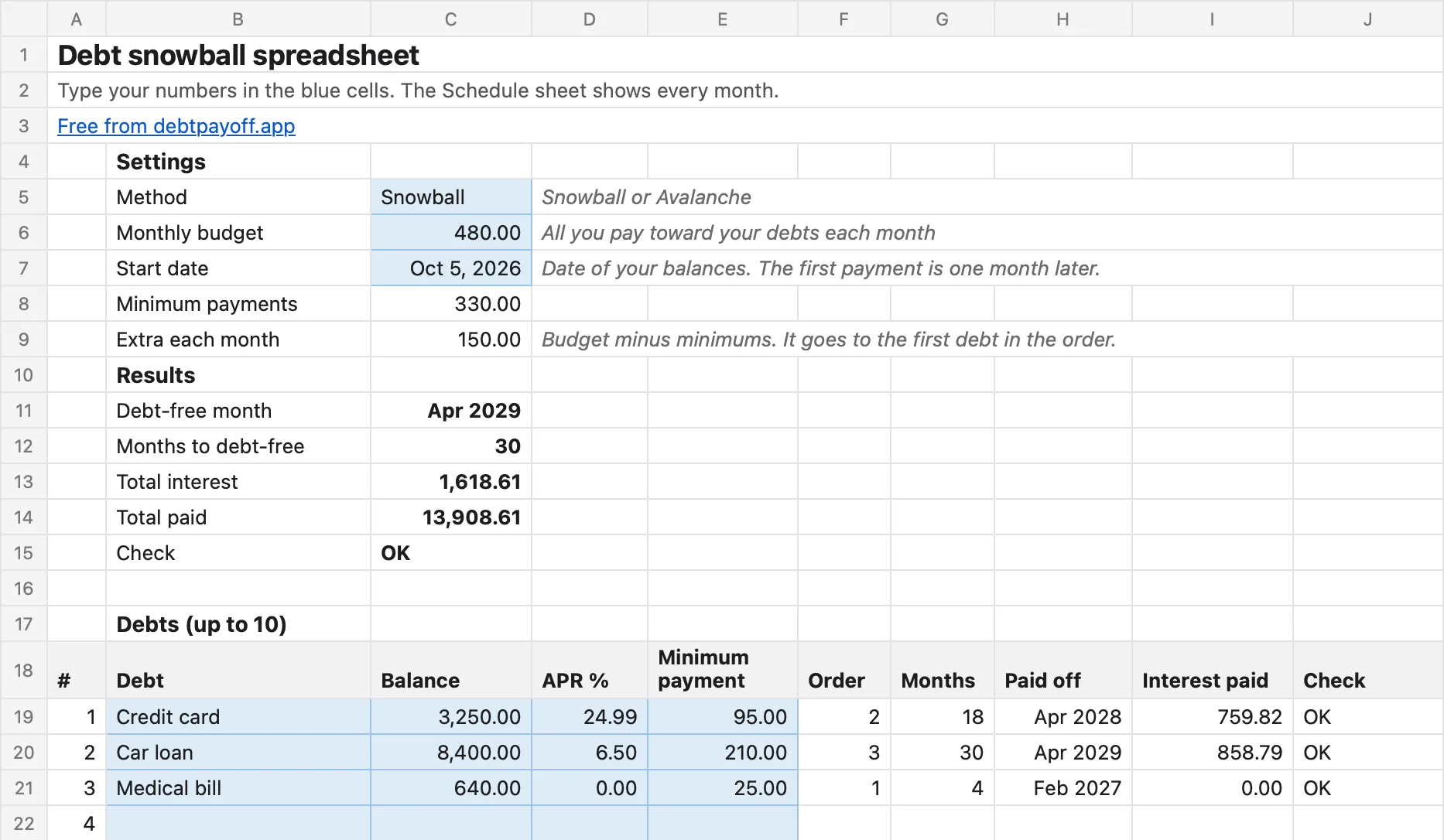
The Plan sheet
How to open it in Numbers, Google Sheets or Excel
- Apple NumbersDownload the file on your iPhone, iPad or Mac and open it in Numbers. Numbers turns it into a Numbers spreadsheet.
- Google SheetsIn a new sheet, choose File, then Import, and upload the file.
- Microsoft ExcelOpen the file. If Excel shows Protected View, click Enable Editing so the sheet can recalculate.
Type in the blue cells on the Plan sheet. The Schedule sheet calculates every month for you.
What each column means
You fill in
- Method
- Snowball pays the smallest balance first. Avalanche pays the highest APR first.
- Monthly budget
- All you can pay toward your debts each month, minimums included.
- Start date
- The date of your balances. It is today unless you type a date. The first payment is one month later.
- Debt, Balance
- A name for each debt and what you owe on it today.
- APR %
- The yearly interest rate. Type 24.99 for 24.99%.
- Minimum payment
- The monthly payment your lender asks for.
The sheet fills in
- Extra each month
- Your budget minus all minimum payments. It goes to the first debt in the order.
- Order
- Which debt gets the extra first, second and so on.
- Months, Paid off
- How many months each debt takes, and the month it is paid off.
- Interest paid
- The interest each debt costs until it is paid off.
- Debt-free month
- The month your last debt is paid off, with total interest and total paid.
- Check
- OK, or what to fix. For example, a minimum payment that does not cover the monthly interest.
- Schedule sheet
- One row per month with each debt’s payment, interest and balance. Rolled over shows the minimums of paid-off debts that now go to the next debt.
How the sheet calculates
- Interest each month is the balance times the APR divided by 12, rounded to the cent.
- Every debt gets its minimum payment. The first debt in the order also gets the extra.
- When a debt is paid off, its minimum payment goes to the next debt from the following month.
- In the month a debt is paid off, you pay only what is left on it. The unused part does not move to another debt that month.
- Snowball orders debts by balance, smallest first. A tie goes to the higher APR. Avalanche orders debts by APR, highest first. A tie goes to the smaller balance.
We checked the file against our debt payoff calculator on 1,397 plans with 1 to 10 debts. Every payment, interest charge and balance matched to the cent, in every month. The one difference is length. The sheet plans up to 360 months (30 years), and its Check cell tells you when a plan needs more.
The same plan without a spreadsheet
The iPhone app Debt Payoff Planner: Tracker builds the same snowball or avalanche plan and tracks each payment. It is free for up to 3 debts, with no account and no bank link. Premium costs $4.99 a month or $29.99 a year.
Questions
All questions
Does the debt snowball spreadsheet work in Apple Numbers?
Yes. Numbers opens .xlsx files on iPhone, iPad and Mac. The sheet uses only common functions such as IF, MIN, ROUND, SUM, COUNTIF and EDATE, which Numbers, Google Sheets and Excel all have.
Is the spreadsheet free?
Yes. The download link is on this page. There is no sign-up, no email and no account.
Why does my result differ from another snowball spreadsheet?
Spreadsheets differ in two rules. Some round interest in another way. Some move the unused part of a payment to the next debt in the same month. This sheet rounds interest to the cent every month and moves freed payments from the next month, like our calculator.
Can I plan more than 10 debts?
Not in this file. The debt payoff calculator on this site also takes up to 10 debts. The iPhone app has no debt limit with Premium.
What if a minimum payment does not cover the interest?
The Check cell and the Check column show a warning. Raise that minimum payment. A plan only works when each payment is more than the debt’s monthly interest.
Which currency does it use?
Any. The sheet shows plain numbers without a currency sign, so it works in dollars, euros, pounds or any other currency.
Read next
All guides- Debt payoff calculatorCompare the snowball and avalanche methods with your balances, interest rates and monthly payments.
- Debt snowball vs. debt avalancheTwo ways to choose where your extra payment goes. Compare the order, time and estimated interest.
- Best debt payoff apps for iPhone (2026)Seven apps compared by price, bank linking, account and privacy label.


